The challenge
The mission: improve onboarding for Personal Backup consumers, people protecting their own photos and documents, not IT teams deploying backup to a fleet of work machines. Success means more trials that save a file in the first session, and more trials that convert to paid.
Backblaze Personal Backup is unlimited computer backup for Mac and PC at $9 a month, with a free trial and no credit card. The consumer page promises "Never lose a file again."
I ran the free trial on Windows and logged 28 findings. Before a single file was safe, the flow asked for two inbox trips (verify the email, then fetch a two-factor code), two password entries, a storage region, and an account type, then downloaded an installer that needs administrator rights. On a PC without admin rights, nothing could be protected at all.
The web account was built to restore and to sell: the first actions were Buy a license or download the installer, and the only file window ended in Continue with Restore.
My role
I chose the problem, ran the trial, logged and ranked every finding, and designed and built the clickable concept with Claude, using public pages and docs only.
My thesis: consumers do not think about backup. They think, are my files safe? So the first job is to save the files that matter today, then offer whole-computer backup.
How I analyzed the problem
I grouped the 28 trial findings into six themes and ranked them by how directly each one blocks the first saved file.
| Theme | Trial evidence | Concept fix | |
|---|---|---|---|
| 1. No way to save a file without installing | Installer downloads unasked; no save from the web | Drag folders into My Files in the browser | |
| 2. Verification and security before value | Sign in again; two-factor code on first sign-in | One email link signs you in; password and two-factor come after | |
| 3. Install wall | Installer needs admin rights | Web first; the desktop app becomes an optional upgrade | |
| 4. Web account built to restore and sell | Buy a license, restore tour, Continue with Restore | Home confirms what is safe; restore moves under Manage files | |
| 5. Signup asks what the product can answer | Region picker, Individual or Organization | Region picked from location; Individual by default | |
| 6. Mixed messages across entry points | Two trial pages, different stats and buttons | One signup form and one tracked event, tagged by source |
The plumbing already exists. Backblaze's B2 web console supports drag-and-drop upload today, up to 500 MB per file in the browser. The gap is the consumer experience, not the storage.
How I solved it
- 1
Lead with your files are safe
Same site navigation as today. The headline speaks to safety, the form asks for one thing, and the 188 billion restored files stat moves below the fold as proof.
- 2
One email, one click
Signup is passwordless. The verify link signs the user in on any device, and if it is opened on a phone, the computer's browser tab signs in too, so setup never breaks.
- 3
Save files in the browser
My Files is a drop target. Users drag folders from File Explorer, the same way they copy to a USB drive, and a familiar copy dialog shows progress with Pause and Cancel. No install, no admin rights.
- 4
Prove every file landed
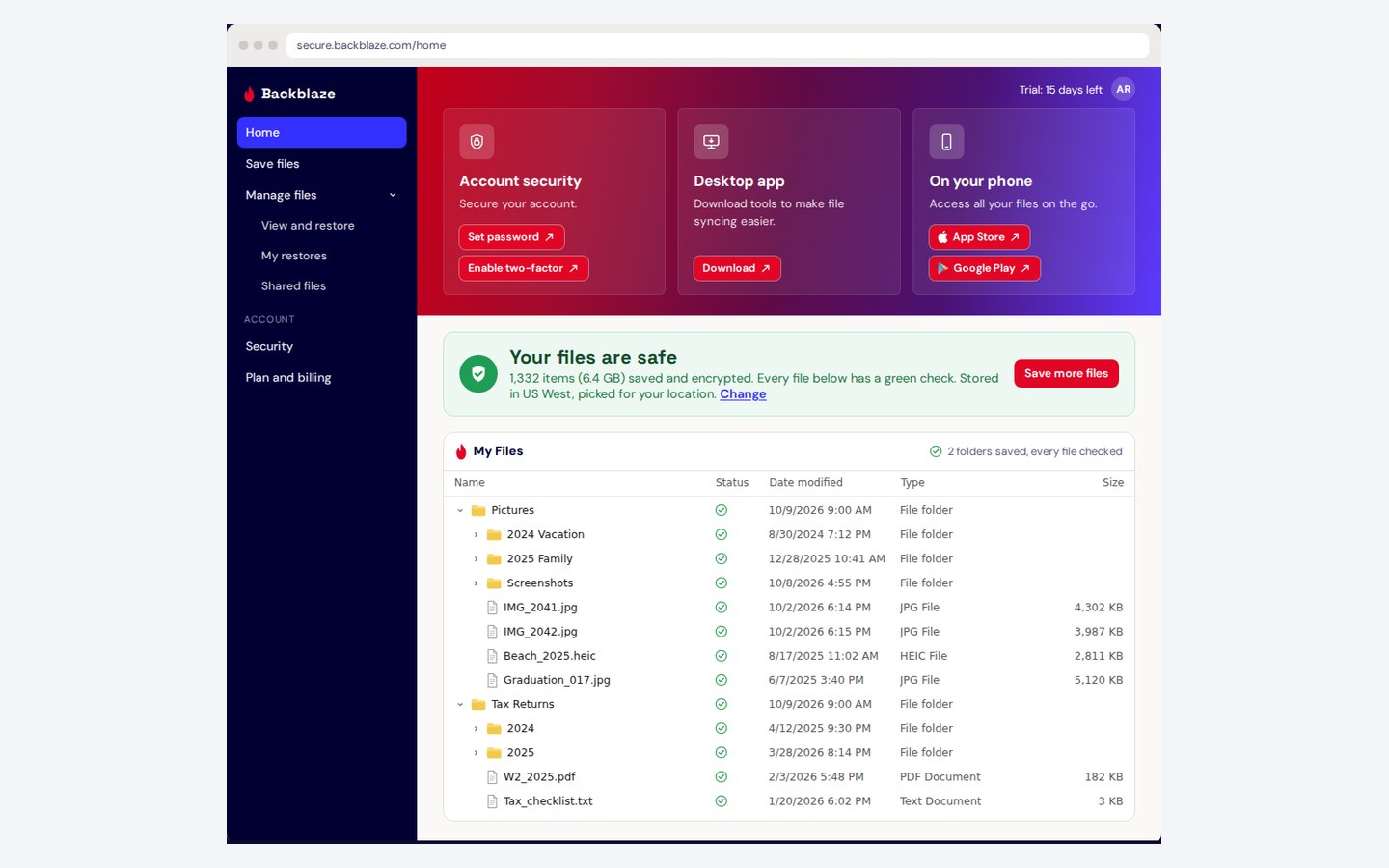
The saved folder opens in My Files in Windows Details view (Name, Status, Date modified, Type, Size) with a green check on every file and folder, so the user can confirm everything came over.
- 5
Security and apps after value
Password, two-factor sign-in, the desktop app, and the phone apps become optional cards after the first save. Restore moves under Manage files and asks what you need back.
- 6
Keep the funnel measurable
One signup component and one tracking event for every entry point, tagged by source, with a single color rule for the primary action.
Results
- Built three prototype versions from the trial findings, each tested in a headless browser at desktop and phone widths.
- Mapped the current flow screen by screen in Figma with redacted trial screenshots, the six ranked themes, and the proposed flow.
- Tied the mission to measures: time to first saved file, share of trials saving a file in session 1, landing to signup rate, two-factor adoption in 7 days, and trial to paid.
- Concept work from public pages and my own trial. Not affiliated with or endorsed by Backblaze.
Try the prototype
Fully clickable, with fictional data. Five steps from signup to every file checked: drag a folder from the File Explorer window into My Files and land on Files safe. Use Existing workflow to step through today's 17-step flow from the live trial, and Product Notes to compare today and the proposal at each step.
Tools and stack
- Claude
- Agentic AI pipelines
- Figma
- Figma MCP
- HTML / CSS / JavaScript
- Headless browser testing
- Live trial walkthrough